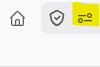
If you are using Firefox and seeing a spinning icon on screen similar to the image below, this may mean that you need to allow audio and video on this site. To do so, click on the highlighted icon in the image below to open the permissions for the page. Select the "Allow Audio and Video" option. After doing to the content should load. If not, try refreshing the page, or closing the page and going back in.
Was this article helpful?
That’s Great!
Thank you for your feedback
Sorry! We couldn't be helpful
Thank you for your feedback
Feedback sent
We appreciate your effort and will try to fix the article